
Uncategorized
How to Change the Voltage on a Boutiq V5: Step-by-Step Guide
Sep
If you’re using a Boutiq Switch V5 for the first time, one of the most useful features to understand is its adjustable voltage. Unlike a basic disposable with a fixed output, V5 units are reported to offer multiple power settings, allowing you to change how warm the vapor feels and how much vapor is produced.
This guide explains how to change the voltage on a Boutiq V5, what the different settings generally mean, and what to do if the voltage adjustment isn’t responding.
Important: Boutiq V5 versions and production batches can differ. Current online guides agree that a rapid three-click sequence is used on adjustable V5 units, but LED colors and exact voltage values are not consistently documented across sources. Check the instructions supplied with your specific device when available.
What Is the Boutiq V5?
The Boutiq Switch V5 is a multi-chamber disposable vape designed to combine several cannabis oil options in one device. Current product guides describe the V5 as having three chambers, a selector system for choosing between them, rechargeable USB-C hardware, and adjustable voltage.
The adjustable-voltage function is particularly useful because different power levels can change the temperature and vapor characteristics of a draw.
Lower settings generally produce cooler vapor and can emphasize flavor, while higher settings produce warmer, denser vapor.
How to Change the Voltage on a Boutiq V5
Changing the voltage is relatively straightforward once you know the button sequence.
Step 1: Check Your V5
Before changing anything, make sure you’re working with a Boutiq Switch V5 that actually has adjustable-voltage controls.
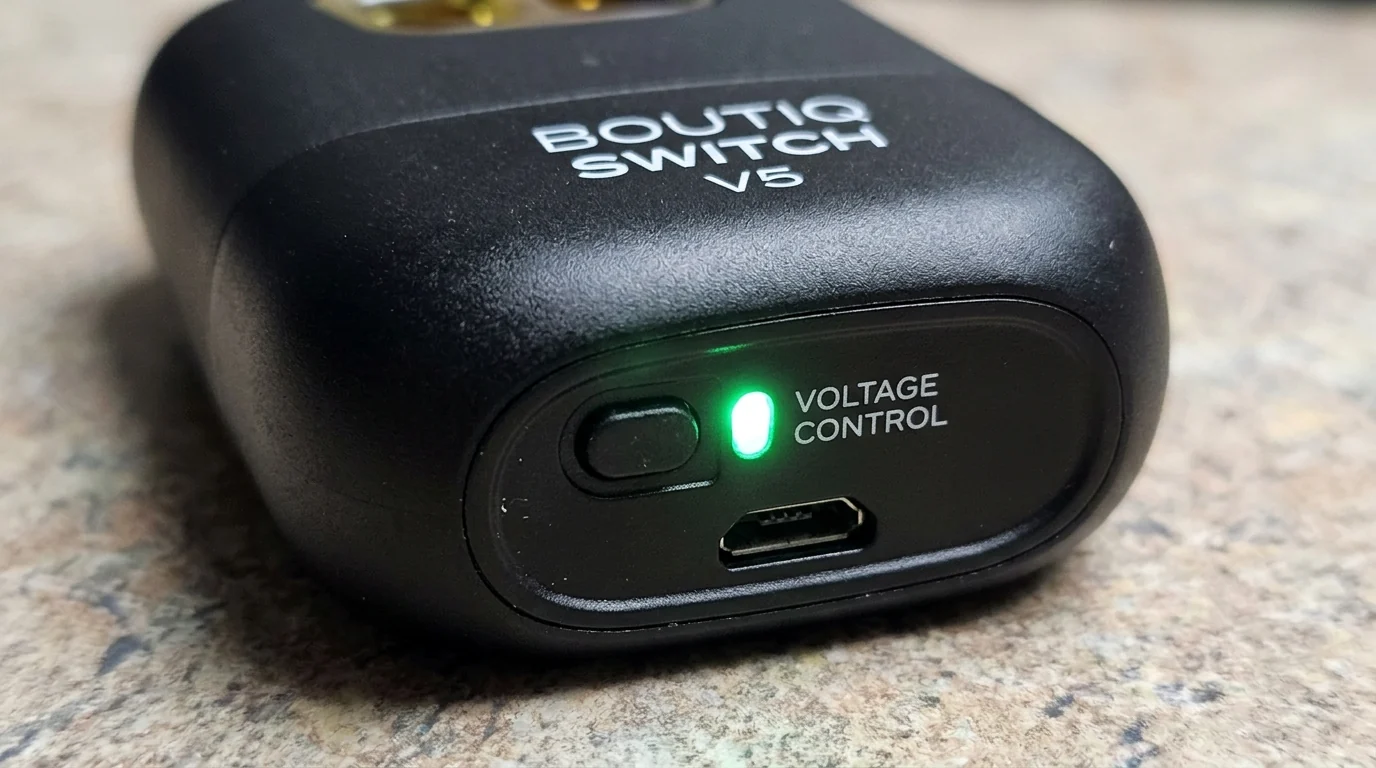
Look for the control button and LED/display indicators. Different V5 batches can have slightly different interfaces, so don’t assume that every Boutiq device operates identically.
If your device came with an instruction sheet, use that as the primary reference.
Step 2: Make Sure the Device Is Unlocked
Several current V5 guides report that five rapid clicks are used to lock or unlock the device. The LED should provide some indication that the device has responded.
If your device doesn’t respond, charge it first and try again.
Step 3: Press the Button Three Times
Once the V5 is active, press the control button three times rapidly.
The three-click sequence is consistently reported by multiple recent V5 guides as the method used to cycle through the available voltage settings.
The important part is the timing. The clicks should be quick and consecutive rather than three slow presses.
Step 4: Check the Indicator
After the three clicks, look at the device’s LED or display.
Depending on the V5 version or production batch, the indicator may use different colors or symbols to represent the selected power level. Some current guides report:
- Green: Low
- Blue: Medium
- White or another color: High
Other sources report red rather than white for the highest setting, which is why it’s safer not to treat one color scheme as universal.
Step 5: Repeat to Cycle Through Settings
If the first setting isn’t what you want, repeat the three-click sequence.
The device cycles through its available settings. Stop once the indicator shows the desired level.
Some V5 users have also reported versions that display power using bolt symbols rather than relying exclusively on LED colors.
What Do the Boutiq V5 Voltage Settings Mean?
Voltage controls the amount of heat delivered to the oil.
Low Voltage
A lower setting generally creates a cooler, lighter vapor. It can be useful when flavor is your priority because lower heat can help avoid overheating the oil.
Recent guides commonly place the low setting around 2.8V, although users should verify the exact specification for their particular V5.
Medium Voltage
Medium is generally described as the balance between flavor and vapor production.
Some current V5 guides identify approximately 3.4V as the medium setting.
For someone unfamiliar with the device, starting at a moderate setting is a sensible approach rather than immediately selecting the highest output.
High Voltage
Higher voltage produces hotter vapor and generally increases vapor density. Some guides report approximately 3.8V for high, while other sources do not confirm the exact value.
Higher heat can also make the vapor harsher and may consume oil more quickly, so increasing the voltage isn’t automatically better.
How to Find the Best Boutiq V5 Setting
There isn’t one voltage that is perfect for every user or every oil formulation.
If you’re primarily interested in flavor, a lower setting is generally preferable.
If you want a balance between flavor and vapor production, medium is commonly described as the middle ground.
Higher settings may produce denser vapor, but they can also increase heat and harshness.
Start conservatively and follow the manufacturer’s recommended settings for your specific device.
Boutiq V5 Voltage vs. V4
One reason people search for how to change voltage on Boutiq V5 is that the V5 differs from earlier Switch models.
Current guides describe the V5 as having adjustable voltage, while many V4 units are reported to use a fixed temperature rather than user-adjustable voltage.
The V5 also adds a third chamber compared with the commonly described dual-chamber V4 configuration.
Therefore, instructions intended for a V4 shouldn’t automatically be applied to a V5.
Boutiq V5 Voltage Not Changing? Try These Fixes
If the three-click sequence doesn’t appear to work, try the following:
Check the Battery
A low battery can prevent the device from responding correctly. Connect it to its USB-C charger and allow it to charge before trying again.
Make the Clicks Faster
The three presses need to be rapid. If the timing is too slow, the device may interpret them differently.
Unlock the Device
Try the reported five-click lock/unlock sequence before attempting the voltage adjustment again.
Check the Indicator
Don’t rely solely on a color you found online. Some V5 versions may use different LED colors or display symbols. If your device came with a manual, follow its indicator chart.
Don’t Force the Device
If the button is stuck, the device is leaking, the housing is damaged, or the battery appears swollen, stop using it. Do not open, puncture, or attempt to repair the battery housing.
Frequently Asked Questions On How to Change the Voltage on a Boutiq V5
How do you change the voltage on a Boutiq V5?
On adjustable V5 units, press the control button three times rapidly to cycle through the available voltage settings. Watch the LED or display to identify the selected level.
What voltage is low on the Boutiq V5?
Several current guides identify the low setting as approximately 2.8V, but exact specifications can vary by version or batch.
What voltage is medium?
Recent V5 guides commonly list approximately 3.4V for the medium setting.
What voltage is high?
Some sources report approximately 3.8V, although this value isn’t consistently confirmed across available V5 documentation. Check your specific device’s instructions before publishing an exact high-voltage figure.
Does lower voltage produce more flavor?
Generally, lower heat can produce cooler vapor and help preserve the flavor characteristics of the oil, while higher heat tends to create denser, warmer vapor.
Why won’t my Boutiq V5 change voltage?
The device may be locked, undercharged, or the button presses may not be registering quickly enough. Charge the device, unlock it if necessary, and retry the rapid three-click sequence.
Can I change the voltage on every Boutiq Switch?
Not necessarily. Current information indicates that adjustable-voltage functionality is associated with the V5, while many V4 units are described as fixed-voltage devices.
Final Thoughts On How to Change the Voltage on a Boutiq V5
Learning how to change the voltage on a Boutiq V5 takes only a few seconds once you know the controls. For adjustable V5 models, the key sequence is generally three rapid button presses, followed by checking the LED or display to confirm the new setting.
Because Boutiq hardware can vary between versions and batches, always prioritize the instructions supplied with your particular device over generic online voltage charts. Start with a lower or moderate setting and avoid assuming that the highest setting provides the best experience.
